
Step 1: Remove information from single page (profile page):
Please go to Customize → Additional CSS and use the code below:
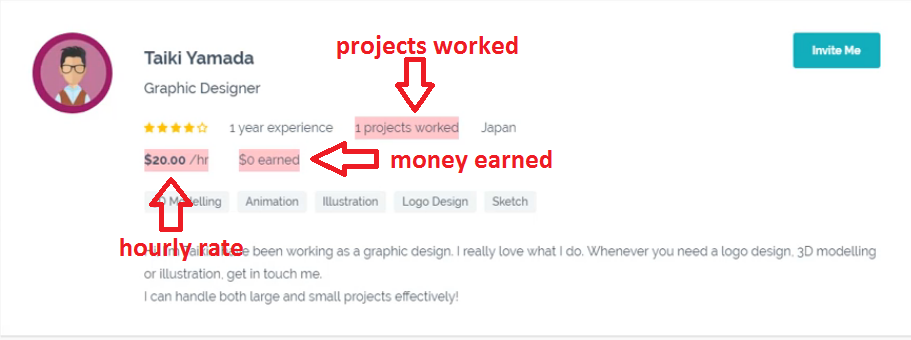
- Remove projects worked:
.freelance-rating span:nth-child(3) {
display: none;
}
- Remove money earned:
.freelance-hourly > :nth-child(2) {
display: none;
}
- Remove money earned + hourly rate:
.freelance-hourly span {
display: none;
}
Note: You can remove many elements in the profile list at a time.
When you’re done, don’t forget to click Save&Publish.
Step 2: Remove information from search page:
Please go to Customize → Additional CSS and use the code below:
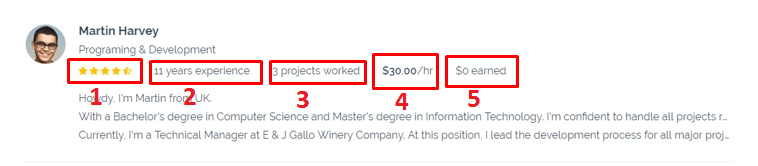 1/ Remove stars rating:
.profile-list-detail > :nth-child(1) {
display: none;
}
2/ Remove years experience:
.profile-list-detail > :nth-child(2) {
display: none;
}
3/ Remove projects worked:
.profile-list-detail > :nth-child(3) {
display: none;
}
4/ Remove hourly rate:
.profile-list-detail > :nth-child(4) {
display: none;
}
5/ Remove money earned:
.profile-list-detail > :nth-child(5) {
display: none;
}
Note: You can remove many elements in the profile list at a time.
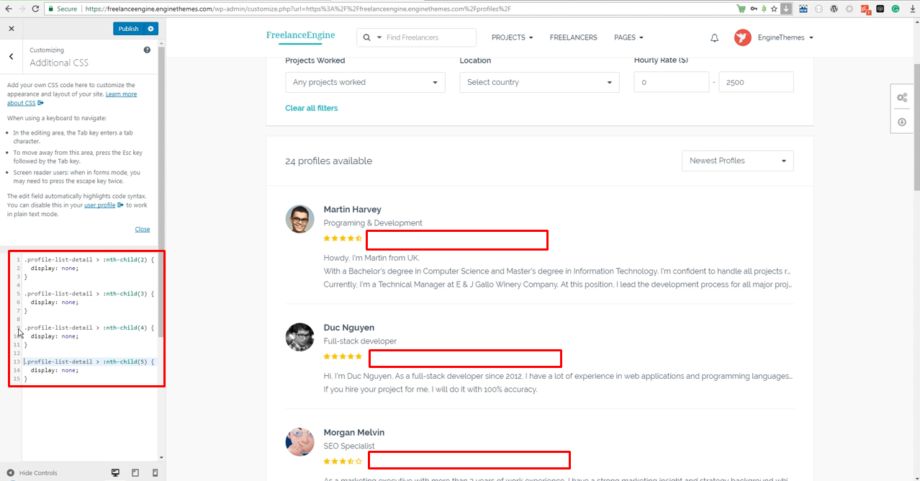
When you’re done, don’t forget to click Save&Publish.
Leave A Comment?
You must be logged in to post a comment.